
Image Scale and Fill Background 1.1.0: transparent PNG support and security coverage
Image Scale and Fill Background is a Drupal image effect. It fits an image of any proportion into a fixed-size box without cropping or distorting it, then fills the remaining area with a background derived from the image itself. The module has been on drupal.org since May 2024 and actively used in TheDropTImes and more than 100 other websties.
Version 1.1.0 was released on 24 August 2026. It completes a release cycle with three outcomes. The project is now covered by Drupal's security advisory policy. The configuration form has been rebuilt and bounded. And images with transparent backgrounds are handled correctly for the first time.
Documentation and an interactive demonstration of every option are at imagescalefill.zyxware.com.
The problem the module solves
A card grid needs every card the same size. Image sources do not arrive the same size. On a news site the photographs come from wire services, press releases and contributors. On an events listing the logos come from whoever submitted them.
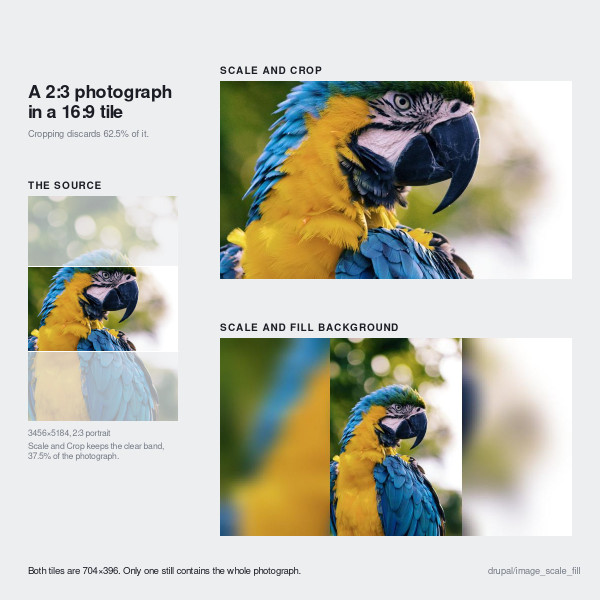
Drupal core offers three ways to force an image into a fixed box, and each gives something up. The five photographs below range from 9.8:1 to 1:1.5. One of them is smaller than the target.
Core Scale preserves every image and returns five different sizes:
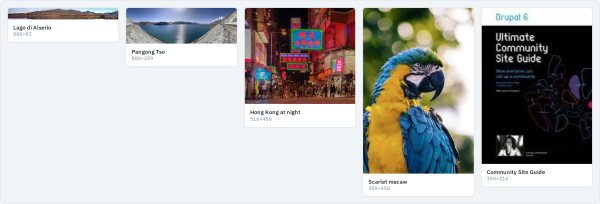
Card heights stop matching. Captions fall out of register. The row height is set by whichever image happened to be tallest.
Core Scale and Crop returns one size, by discarding content:

The panorama loses most of its width. The portrait loses its upper and lower thirds. The book cover loses the top of its title.
Scale and fill background returns one size and discards nothing:

| Effect | Output size | Aspect ratio | Content |
|---|---|---|---|
| Scale | varies | preserved | preserved |
| Resize | exact | not preserved | preserved |
| Scale and Crop | exact | preserved | cropped |
| Scale and fill background | exact | preserved | preserved |
Why this was built
It was built for The Drop Times, a Drupal news publication with several display modes at different aspect ratios. The photographs and logos that fill them arrive from contributors, press offices and event organizers worldwide, at whatever proportions the sender chose, and the editorial team was cropping or re-editing images by hand to make them fit. The approach was proposed by Sebin A. Jacob, its editor-in-chief, and has been in production there since 2024.
Logos and transparency: what 1.1.0 fixes
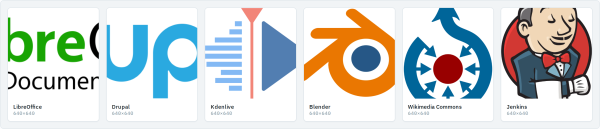
Logos push the proportions further than photographs do. The six marks below span 4.23:1 to 1:1.38. They also bring a problem photographs do not have. Most of them are transparent PNGs, which contain no background content from which a fill can be derived.
Under Scale and Crop, marks become unreadable fragments. The Drupal wordmark renders as "up". LibreOffice renders as "ibreO Document".
Under Scale and fill background in 1.1.0, output is uniform and every mark is intact. Each transparent source is given a chosen background instead of being composited onto the black canvas:
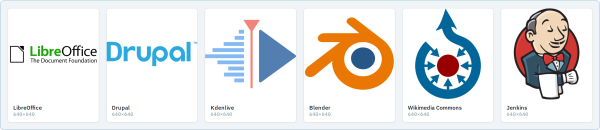
Before 1.1.0 a transparent logo was composited onto the effect's canvas, which is black. Because the background was a blurred copy of the source, the result was the mark smeared behind itself on a dark field. Under the dominant colour background type the failure was quieter and worse. The effect sampled only the opaque pixels, so a single-colour mark was given a background of its own colour and disappeared entirely.
Version 1.1.0 adds one setting, Images with a transparent background, with four values:
| Option | Behaviour | Use when |
|---|---|---|
| Do nothing | The background type is applied to the logo as though it were a photograph | Sources are never transparent |
| Automatic | A light or dark fill, selected per image | Source artwork is not controlled by the site |
| Fixed colour | One configured colour for every source | Source artwork is known and consistent |
| From the image | The mark's own mean colour, mixed 85% toward white or black | A uniform white background is not acceptable |
Automatic does not average the colour. It measures the proportion of the artwork's ink whose WCAG relative luminance exceeds 0.5, and picks the dark fill when that proportion goes above 70%. Dark artwork gets a light ground. White artwork gets a dark one. Same setting, opposite answer.
The fill is applied only to images that are genuinely transparent, meaning 5% or more of sampled pixels. Across the thirteen sources on the demonstration site, the transparent logos measured between 28.6% and 76.5% transparent, while the photographs measured a flat 0.0%. Nothing fell in between. One image style can therefore process a feed of photographs and logos together.
Documentation and demonstration
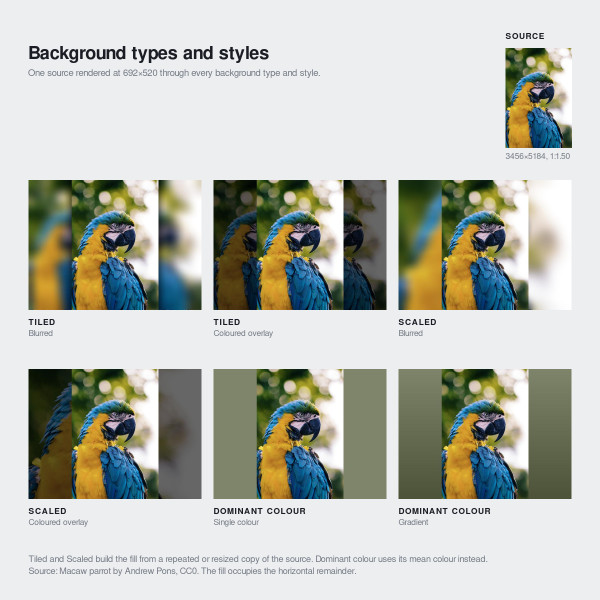
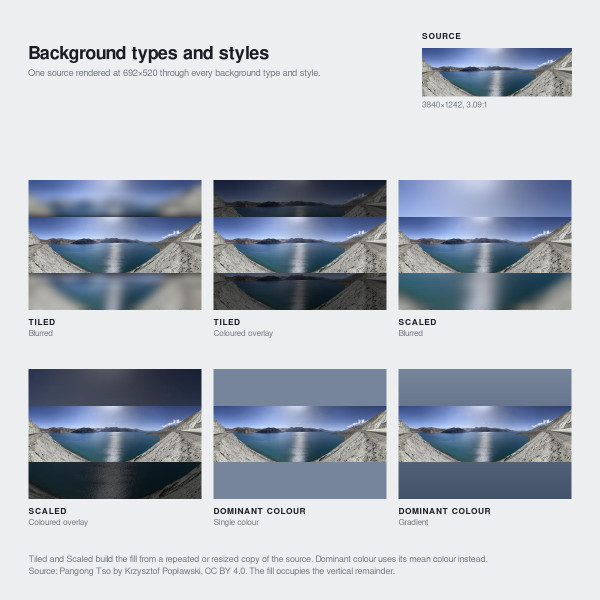
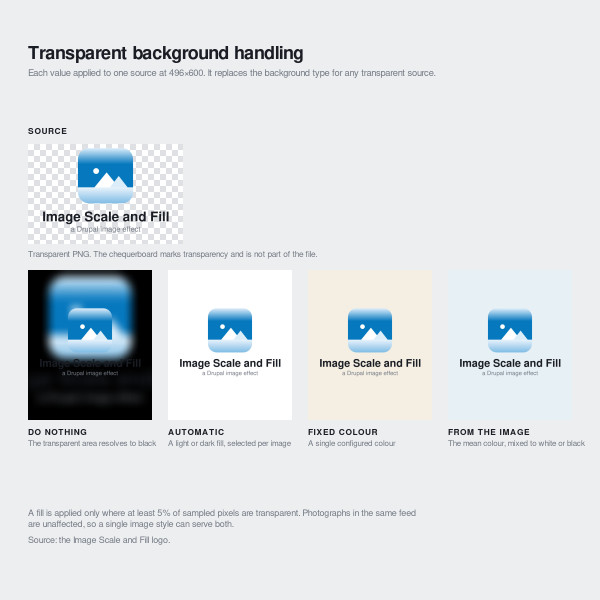
Every configuration option is documented and demonstrated at imagescalefill.zyxware.com, using real derivatives generated by the effect. The page covers the five background treatments, the four transparent-background options, the full settings reference with measured costs, and exported image style configuration ready to import.
Installation
composer require drupal/image_scale_fill
drush en image_scale_fill
drush updatedb
Add Scale and fill background to an image style at /admin/config/media/image-styles, placing it last. Anything after it operates on the canvas this effect has drawn.
Sites upgrading from an earlier release should note that the database update sets every image style already using the effect to Do nothing, so the images those styles produce do not change. The Automatic default applies only to effects added afterwards.
Links
Illustrations are derivatives generated by the image effect from Creative Commons and public domain sources on Wikimedia Commons. Those requiring attribution: Lago di Alserio (Kaitu, CC BY 4.0), Pangong Tso (Krzysztof Popławski, CC BY 4.0), LibreOffice logo (Christoph Noack, CC BY-SA 3.0), Commons logo (Reidab, Grunt, 3247, Pumbaa80, CC BY-SA 3.0) and Jenkins logo (The Jenkins project, CC BY-SA 3.0). Derivatives of the CC BY-SA 3.0 works are offered under the same licence. The marks shown are the property of their respective projects and are reproduced as sample artwork only; no affiliation or endorsement is implied.


