A Comprehensive Guide to Selecting the Right Hosting Solution for Your Drupal Project
Introduction
Drupal is renowned for its flexibility as an enterprise-grade content management system, capable of powering a wide array of web applications and composable architectures. The backbone of any high-performing Drupal website is its hosting infrastructure. The right hosting solution ensures that your platform is not only fast and secure, but also resilient, compliant, and scalable. With a wide spectrum of hosting options available today, this guide helps business owners, IT leaders, and digital strategists planning to use Drupal for their website or Digital Experience Platform (DXP) project make an informed hosting decision.
Hosting Options at a Glance
Below is a concise comparison of the five primary Drupal hosting models to consider:
| Hosting Option | Ideal For | Pros | Cons | Examples |
|---|---|---|---|---|
| Platform as a Service (PaaS) | Medium to Large Businesses, Mission-Critical DXPs | Built-in Drupal optimization (Varnish, Redis, Solr), automated Git/CI/CD workflows, zero server maintenance, expert Drupal support | Higher monthly investment; platform-specific guardrails | Acquia, Pantheon, Upsun (formerly Platform.sh), Amazee.io |
| Managed Cloud & VPS Hosting | Small to Medium Businesses, Growing Sites without Dedicated DevOps | Hands-off server management, predictable performance, built-in backups and security monitoring, lower cost than enterprise PaaS | More expensive than shared hosting; vertical scaling limits; requires basic Composer/SSH familiarity for Drupal updates | Cloudways, ScalaHosting, SiteGround, Hosting.com (formerly A2 Hosting) |
| DIY VPS Hosting | Medium-Sized Scalable Projects with In-House DevOps or Agency Support | Full root control and customization, high price-to-performance ratio, predictable fixed monthly pricing | Requires Linux/DevOps expertise; full responsibility for security patching, backups, and uptime | DigitalOcean, Akamai Connected Cloud (Linode), AWS Lightsail, Hetzner |
| Shared Hosting | Personal Projects, Prototypes, Low-Traffic Brochure Websites | Most budget-friendly entry point, beginner-friendly control panels | Strict resource limits; often lacks SSH/Composer on base tiers; noisy-neighbor performance bottlenecks | Hostinger, SiteGround, Bluehost, InMotion Hosting |
| Infrastructure as a Service (IaaS) | Large-Scale Enterprises, Complex Multi-Service or Regulated Workloads | Infinite horizontal/auto-scaling, complete architectural and security control, deep integration with cloud AI and data services | High DevOps complexity, variable usage-based billing, significant management overhead | AWS, Google Cloud Platform (GCP), Microsoft Azure |
This table offers a snapshot of the hosting environments suited for different organizational needs. Before diving into each option, keep in mind that modern Drupal (Drupal 10, Drupal 11, and Drupal CMS) relies on Composer 2.7+, PHP 8.3+, SSH/Drush CLI access, and customizable document roots (/web). Let’s explore how each hosting category stacks up.
1. Platform as a Service (PaaS) for Drupal
What is PaaS?
Platform as a Service (PaaS) is a cloud-computing model that provides a complete, pre-engineered application platform—combining cloud hardware, container orchestration, caching layers, and developer tooling—without the complexity of building and maintaining the underlying infrastructure. For Drupal, specialized PaaS providers pre-configure reverse proxies (Varnish/CDN), object caching (Redis/Memcached), search engines (Apache Solr/OpenSearch), and Composer-based deployment pipelines out of the box.
PaaS is Ideal for Whom?
PaaS is ideal for medium-to-large organizations, government agencies, higher education institutions, and enterprises that want their teams focused on Drupal application development and digital experiences rather than server administration. It is the gold standard for teams prioritizing rapid deployment cycles, automated staging environments, and high availability.
Pros of PaaS for Drupal
- Application-Focused WebOps: Teams can concentrate on building features, content workflows, and decoupled frontends rather than patching Linux servers or tuning databases.
- Turnkey Drupal Optimization: Environments come pre-tuned for Drupal with edge caching, Redis, automated Composer builds, Drush integration, and PHP version management.
- Streamlined CI/CD & Cloning: Git-driven workflows allow developers to spin up exact clones of production environments (code, database, and files) on every pull request for seamless testing and QA.
- Enterprise Security & Expert Support: Direct access to Drupal infrastructure specialists, automated security patching, WAF/DDoS protection, and compliance certifications (SOC 2, ISO 27001, FedRAMP, HIPAA).
Cons of PaaS for Drupal
- Cost Implications: While PaaS substantially reduces internal DevOps labor costs, its direct monthly subscription fees are higher than standard VPS or shared hosting options.
- Platform Guardrails: Because the underlying infrastructure is standardized and read-only in production for security, organizations with unconventional server-level software requirements may find standard PaaS tiers restrictive.
When to Choose PaaS?
Choose PaaS when your Drupal site is business-critical, requires zero-downtime deployments, experiences high or fluctuating traffic, or involves multiple developers and content stakeholders collaborating across development, staging, and production environments.
Leading PaaS Providers for Drupal
- Acquia Cloud Platform: Founded by Drupal creator Dries Buytaert, Acquia offers an enterprise DXP cloud featuring Cloud IDE, Site Factory for multisite governance, automated scaling, and elite Drupal support.
- Pantheon: A leading WebOps platform for Drupal that excels in agile team workflows, featuring its Global CDN, Multidev branch environments, and automated visual regression testing with Autopilot.
- Upsun (formerly Platform.sh): Delivers a flexible, Git-driven container platform with instant environment branching, transparent usage-based resource scaling, and native support for both monolithic and decoupled Drupal architectures.
- Amazee.io: Built on the open-source Lagoon platform, Amazee.io provides Kubernetes- and Docker-based Drupal hosting with complete transparency, multi-cloud portability, and dedicated enterprise support.
By leveraging a specialized PaaS solution like Acquia, Pantheon, Upsun, or Amazee.io, organizations gain a resilient, high-velocity environment that lowers total operational risk and accelerates time-to-market.
2. Managed Cloud & VPS Hosting for Drupal
What is Managed Hosting?
Managed Cloud and Managed VPS Hosting bridges the gap between high-end enterprise PaaS and raw DIY servers. In this model, the hosting provider provisions dedicated virtual server resources and handles daily operating system updates, security monitoring, automated backups, and server stack optimization (Nginx/Apache/LiteSpeed, PHP-FPM, MySQL/MariaDB), while giving you a streamlined control panel and SSH access to deploy your Drupal site.
Managed Hosting is Ideal for Whom?
This option is tailored for small to medium-sized businesses (SMBs), digital agencies, and organizations that need dedicated compute resources and reliable uptime for Drupal without hiring a dedicated systems administrator or paying enterprise PaaS prices.
Pros of Managed Hosting for Drupal
- Hands-Off Server Maintenance: The provider manages OS patching, firewall rules, hardware health, and server monitoring so your team can focus on your website.
- Enhanced Security & Backups: Includes automated daily or on-demand backups, free SSL management, malware scanning, and proactive server hardening.
- Dedicated Resources & Predictable Performance: Unlike shared hosting, managed VPS and cloud plans allocate dedicated RAM and vCPU cores, preventing other websites from slowing down your Drupal installation.
- Intuitive Management Dashboards: Modern control panels (such as Cloudways Dashboard, SPanel, Site Tools, or cPanel) simplify database management, cron job scheduling, PHP version switching, and SSH key setup.
Cons of Managed Hosting for Drupal
- Cost Factor: Managed plans cost more than entry-level shared hosting and more than unmanaged bare-metal VPS instances.
- Varying Levels of Drupal Specialization: Many managed hosts are primarily marketed toward WordPress; while they run PHP applications smoothly, your developer will still need to use SSH, Composer, and Drush to manage Drupal updates properly.
- Control & Multi-Service Limitations: Root access is often restricted to protect the managed stack. If your Drupal project grows to require complex multi-node clusters or custom services like dedicated Apache Solr nodes, a basic managed VPS can hit architectural ceilings.
When to Choose Managed Hosting?
Opt for Managed Cloud or Managed VPS Hosting when your Drupal site requires dedicated memory, server-level caching (like Redis or Varnish), and reliable 24/7 infrastructure support, but your project budget or scale does not warrant an enterprise PaaS contract.
Notable Managed Hosting Providers for Drupal
- Cloudways: A flexible managed cloud platform that lets you deploy Drupal on top of DigitalOcean, AWS, or Google Cloud servers with built-in Varnish, Redis, staging environments, and SSH/Composer support.
- ScalaHosting: Offers high-performance managed cloud VPS plans featuring its lightweight proprietary SPanel control panel, dedicated resources, SShield cybersecurity, and SSH/CLI access for Composer workflows.
- SiteGround (Cloud & GrowBig/GoGeek Plans): Powered by Google Cloud infrastructure, SiteGround provides ultrafast PHP, custom Site Tools management, automated daily backups, and pre-installed Drush and SSH support.
- Hosting.com (formerly A2 Hosting): A long-time Drupal community supporter offering managed VPS and Turbo server plans with pre-configured OPcache/Memcached optimization and developer-friendly SSH access.
- Hostinger (Cloud & Business Tiers): Provides an accessible managed cloud environment using LiteSpeed web servers, NVMe storage, and its custom hPanel dashboard—suitable for smaller Drupal sites when paired with plans that include SSH and Composer 2 support.
Managed Cloud and VPS Hosting offers an excellent balance of convenience, performance, and affordability—allowing growing businesses to run modern Drupal sites smoothly without taking on raw server administration.
3. Virtual Private Server (VPS) for Drupal (DIY)
What is a DIY VPS?
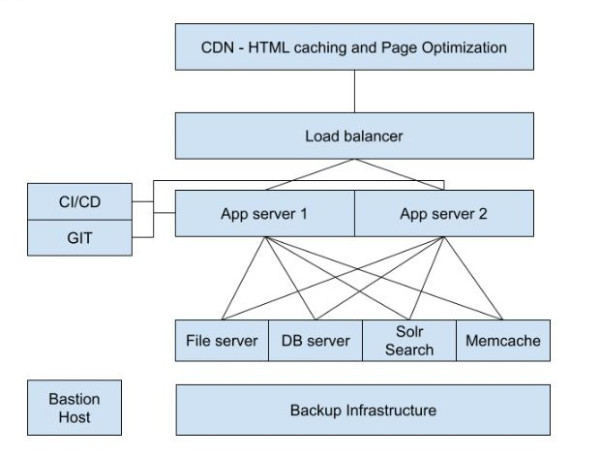
A self-managed Virtual Private Server (DIY VPS) provides a virtualized Linux server with dedicated vCPU, RAM, and NVMe/SSD storage partitioned on a physical host. Unlike managed hosting, a DIY VPS gives you a clean operating system (such as Ubuntu or Debian) with full root access—meaning your team or agency is responsible for installing, configuring, and securing the entire web stack (Nginx/Apache, PHP, MySQL/MariaDB, Redis, Composer, and firewalls) for Drupal.
DIY VPS is Ideal for Whom?
DIY VPS hosting is ideal for organizations that have an in-house Linux/DevOps engineer or partner with a Drupal development agency to manage their infrastructure. It fits medium-sized projects that need custom server software (such as Apache Solr, Elasticsearch, or custom Node.js microservices) at a highly predictable, fixed monthly hardware cost.
Pros of DIY VPS for Drupal
- Complete Root Control & Customization: Full freedom to configure custom PHP extensions, fine-tune MariaDB/MySQL buffers, run Docker containers, or host companion services like Apache Solr and Redis on your own terms.
- Smooth Vertical Scalability: As traffic or content grows, you can resize RAM, CPU, and block storage or attach managed databases and load balancers with minimal friction.
- Exceptional Cost-to-Performance Ratio: Without a management markup, raw cloud VPS instances deliver significantly more compute power and memory per dollar than managed or PaaS alternatives.
Cons of DIY VPS for Drupal
- DevOps Skill Requirement: Provisioning, tuning, and troubleshooting a production Linux stack requires solid system administration expertise.
- Ongoing Maintenance & Security Responsibility: Your team is 100% responsible for OS security updates, SSL renewals, firewall hardening, intrusion detection, backup verification, and uptime recovery.
When to Choose a DIY VPS?
Choose a DIY VPS when you need custom server configurations, full root access, and strict hardware cost predictability—and you have either internal DevOps capabilities or a trusted Drupal technical partner managing the server lifecycle.
Leading DIY VPS Providers for Drupal
- DigitalOcean: A developer favorite offering Droplets (VPS), Managed Databases, Spaces object storage, and straightforward, predictable pricing ideal for scalable Drupal setups.
- Akamai Connected Cloud (formerly Linode): Combines Linode’s renowned developer simplicity and predictable Linux virtual machines with Akamai’s global edge network for low-latency Drupal delivery.
- AWS Lightsail: Provides bundled virtual private servers, databases, and CDN distributions on AWS infrastructure at a fixed, predictable monthly price.
- Hetzner & Vultr: Offer high-frequency NVMe compute instances at highly competitive price points, helping budget-conscious engineering teams reduce infrastructure costs substantially.
For technically capable teams, DIY VPS hosting provides the raw power and architectural freedom to tailor every layer of the stack to your Drupal application's exact requirements.
4. Shared Hosting for Drupal
What is Shared Hosting?
Shared Hosting is an entry-level web hosting environment where multiple websites reside on a single physical server and share underlying CPU, RAM, and disk I/O resources. Because hardware and maintenance costs are distributed across hundreds of accounts, it is the least expensive way to put a website online.
Shared Hosting is Ideal for Whom?
Shared hosting is best suited for individuals, students, hobbyists, or short-lived micro-campaigns with minimal traffic and tight budgets.
Pros of Shared Hosting for Drupal
- Affordability: Offers the lowest monthly cost of entry for testing ideas or running small hobby projects.
- Beginner-Friendly Control Panels: Plans include visual dashboards (such as cPanel, hPanel, or Site Tools) for managing domains, emails, and databases without command-line complexity.
- Quick Setup for Basic Prototypes: Suitable for lightweight, low-traffic informational sites that do not require complex search indexing or heavy authenticated user sessions.
Cons of Shared Hosting for Drupal
- Composer & SSH Restrictions on Entry Plans: Modern Drupal (Drupal 10/11 and Drupal CMS) requires Composer 2.7+, PHP 8.3+, at least 256MB+ of PHP memory, and custom
/webdocument root configuration. The cheapest shared hosting tiers frequently block SSH access or run out of memory during Composer updates. - Unpredictable Performance: Because server resources are shared and lack dedicated object caching (like Redis), traffic spikes on neighboring websites can slow down your Drupal pages.
- Limited Security Isolation: Multi-tenant shared environments offer less isolation and customization than containerized PaaS or virtualized VPS setups.
When to Choose Shared Hosting?
Opt for Shared Hosting only for personal learning projects, proofs of concept, or temporary, low-traffic brochure websites where minimizing upfront cost is the primary objective.
Considerations for Shared Hosting with Modern Drupal
If you choose shared hosting for a modern Drupal site, avoid legacy "1-click script installers" that deploy flat, non-Composer file structures, as these make future Drupal security updates and module installations difficult. Always select a shared hosting tier (typically a mid-to-upper tier) that explicitly includes SSH terminal access, Composer 2, PHP 8.3+, and the ability to point your domain’s document root to Drupal’s /web directory. As soon as your site grows in traffic or business importance, plan to migrate to a Managed Cloud/VPS or PaaS environment.
Notable Shared Hosting Providers for Drupal
- SiteGround: One of the strongest shared hosting choices for Drupal, running on Google Cloud with its custom Site Tools interface, free daily backups, and built-in SSH, Git, Composer, and Drush support.
- Hostinger: Offers budget-friendly LiteSpeed-powered hosting managed through its custom hPanel dashboard. For Drupal, choose the Premium or Business tiers (rather than the Single tier) to ensure SSH and Composer 2 access are included.
- Hosting.com (formerly A2 Hosting): A long-standing Drupal community supporter providing shared plans with SSH access, high PHP memory limits, and Turbo caching options.
- Bluehost & InMotion Hosting: Traditional cPanel-based shared hosting providers that support Drupal setups for entry-level websites; ensure SSH access is enabled in your control panel to manage Composer dependencies.
While Shared Hosting can serve as an economical starting point for simple websites, business-critical Drupal applications will quickly benefit from upgrading to a Managed VPS or Drupal PaaS.
5. Infrastructure as a Service (IaaS) for Drupal
What is IaaS?
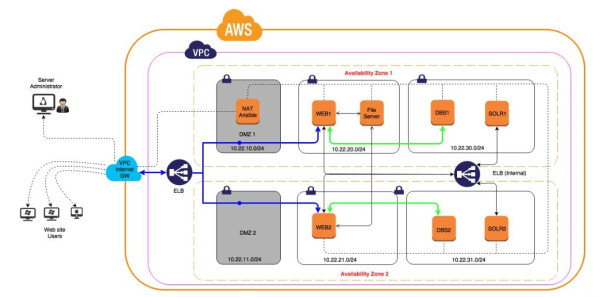
Infrastructure as a Service (IaaS) is a hyperscale cloud computing model that delivers virtualized compute instances, managed Kubernetes clusters (EKS, GKE, AKS), serverless relational databases, global CDNs, and enterprise networking on a pay-as-you-go basis. IaaS provides the raw building blocks to architect highly available, multi-region, auto-scaling Drupal environments.
IaaS is Ideal for Whom?
IaaS is built for large enterprises, high-traffic media and e-commerce platforms, and regulated organizations that already have mature Cloud/DevOps engineering teams (or a managed cloud partner) and need deep integration with broader enterprise cloud ecosystems.
Pros of IaaS for Drupal
- Elastic Auto-Scaling & High Availability: Automatically scale web containers or EC2/VM instances horizontally across multiple availability zones to handle massive, unpredictable traffic surges without downtime.
- Granular Security & Compliance Control: Design custom Virtual Private Clouds (VPCs), private subnets, IAM policies, hardware security modules, and data-residency boundaries tailored to strict regulatory mandates.
- Cloud-Native Ecosystem Integration: Seamlessly connect your Drupal DXP with cloud-native services such as managed OpenSearch, ElastiCache (Redis), S3/Cloud Storage, data lakes, and enterprise AI/LLM APIs (AWS Bedrock, Google Vertex AI, Azure OpenAI).
Cons of IaaS for Drupal
- High Architectural & DevOps Complexity: Designing, automating (via Terraform/Kubernetes), and maintaining a fault-tolerant Drupal cluster on raw IaaS requires specialized cloud engineering talent.
- FinOps & Billing Complexity: Usage-based pricing across compute, egress bandwidth, load balancers, and managed databases can become expensive and unpredictable without active cloud cost optimization.
- Operational Overhead: Unlike a Drupal PaaS, your cloud team must build and maintain the Drupal-specific CI/CD pipelines, Varnish/CDN invalidation logic, and application monitoring stack.
When to Choose IaaS?
Choose IaaS when your organization standardizes on a hyperscale cloud provider, requires custom multi-region redundancy or strict data sovereignty, or needs Drupal to operate inside a larger enterprise cloud network alongside custom microservices and data pipelines.
Leading IaaS Providers for Drupal
- Amazon Web Services (AWS): Offers the broadest cloud ecosystem for enterprise Drupal deployments, combining EC2/ECS/EKS compute with Amazon RDS/Aurora, ElastiCache for Redis, S3, CloudFront, and OpenSearch.
- Google Cloud Platform (GCP): Renowned for its high-speed global fiber network, Google Kubernetes Engine (GKE), Cloud SQL, Cloud CDN, and seamless integration with BigQuery and Vertex AI.
- Microsoft Azure: A strong choice for enterprises deeply invested in the Microsoft ecosystem, offering Azure Kubernetes Service (AKS), Azure Database for MySQL, Front Door CDN, and Azure DevOps pipelines.
Hyperscale IaaS platforms like AWS, Google Cloud, and Azure provide an unmatched foundation for complex, large-scale Drupal ecosystems—giving enterprises total control over performance, compliance, and innovation.
Making the Right Choice
Technical Checklist for Modern Drupal Hosting
Regardless of which hosting tier you select, verify that your provider supports these baseline requirements for modern Drupal (Drupal 10, Drupal 11, and Drupal CMS):
- PHP & Database Compatibility: Support for PHP 8.3 / 8.4+ with at least 256MB–512MB PHP memory limit, and MySQL 8.0+ or MariaDB 10.6+ (with
READ-COMMITTEDtransaction isolation). - Composer & CLI Tooling: Native SSH access with Composer 2.7+ and Drush support for secure dependency management and automated deployments.
- Document Root Flexibility: Ability to serve the site from Drupal’s standard
/websubdirectory so vendor and configuration files remain outside the public web root. - Multi-Layer Caching: Support for in-memory object caching (Redis or Memcached) and edge/reverse-proxy page caching (Varnish or a modern CDN).
Aligning Hosting with Marketing and Technology Needs
When choosing the right Drupal hosting solution, it is imperative to align with both marketing objectives and technology capabilities, as highlighted in our article on the dependency of marketing and technology on hosting infrastructure requirements.
Consider these strategic factors:
- Digital Transformation & Marketing Objectives: Reflect on your organization's digital roadmap, including lead generation, personalization, customer acquisition, and retention. Your hosting infrastructure must support these initiatives without performance bottlenecks.
- Change Management & Organizational Maturity: Evaluate your internal team's technical capacity. Does your team have the DevOps bandwidth to manage a VPS/IaaS setup, or will a Managed Cloud or PaaS free them to deliver faster business value?
- Marketing and Technology Confluence: Ensure that the hosting platform can support the integrated digital experience required for omnichannel, decoupled, or AI-assisted customer journeys.
- Traffic Patterns and Content Requirements: Anticipate both baseline traffic and campaign-driven spikes, as well as rich media delivery and search indexing needs.
Integrating Marketing Objectives with Hosting Decisions
The choice of hosting for your Drupal site is not merely an IT procurement task—it is a strategic business decision. Marketing initiatives are deeply intertwined with your DXP hosting infrastructure's speed, uptime, and agility. A well-chosen hosting solution directly supports your marketing goals, such as lead generation, SEO performance (Core Web Vitals), and customer experience enhancement.
- Strategic Alignment: Ensure that your hosting model aligns with both your technical governance requirements and your marketing velocity.
- Evaluate Total Cost of Ownership (TCO): Factor in the hidden cost of developer and sysadmin hours—not just the monthly server bill—when comparing DIY infrastructure against Managed Cloud or PaaS solutions.
- Stay Agile and Future-Ready: Choose an architecture that gives your Drupal platform a clear scaling path as your traffic, integrations, and organizational ambitions grow.
By weighing these technical and strategic factors together, you can select a hosting foundation that keeps your Drupal platform fast, secure, and ready to propel your digital growth forward.