
Google Analytics 4 Migration Guide: Best Practices for a Smooth Transition
Introduction
Google announced the end-of-life for Universal Analytics (UA)1, which means that marketers and businesses must undergo a GA4 migration to upgrade to the latest version of Google Analytics.
The deadline for the transition is July 1st, 2023, and it is essential to start the migration process as soon as possible to ensure a smooth transition.
What does it mean for you?
If you are using the old version of Google Analytics, popularly known as Univeral Analytics (UA), after July 1st, the data from your website or app will not get updated on it. Ie. It will move to read-only mode, and most probably within, six months1 from then, it will entirely shut down operations.
The new and better version of Google Analytics, popularly known as GA4, is already available, and it is possible to migrate to GA4 from Univeral Analytics.
Google Analytics 4 Migration: Follow These Best Practices for Seamless Upgrade
From our experience in migrating multiple Universal Analytics properties to GA4, we have a playbook to migrate. The key steps involve
- Create a new GA4 property and automatically migrate whatever is possible from your UA property. The objective is to get GA4 to start receiving data as early as possible.
- Do an audit of your UA, specifically on Goals, Reports, Content Groups, Channel Classification, Views, Events, Custom Dimensions, Automated emails etc. and document and prioritize the items you want to migrate to GA4.
- Do an audit of the scripts, tags, and event triggers you have implemented in your Website or App and document and prioritize the items you want to migrate to GA4.
- Create a comprehensive checklist with all the items identified in the audit, so that we do not miss any items during migration.
- Create the list of reports that should be created in GA4 and other reports that will be easier to create in tools like Looker Studio.
- Do the migration based on the documentation and checklist prepared.
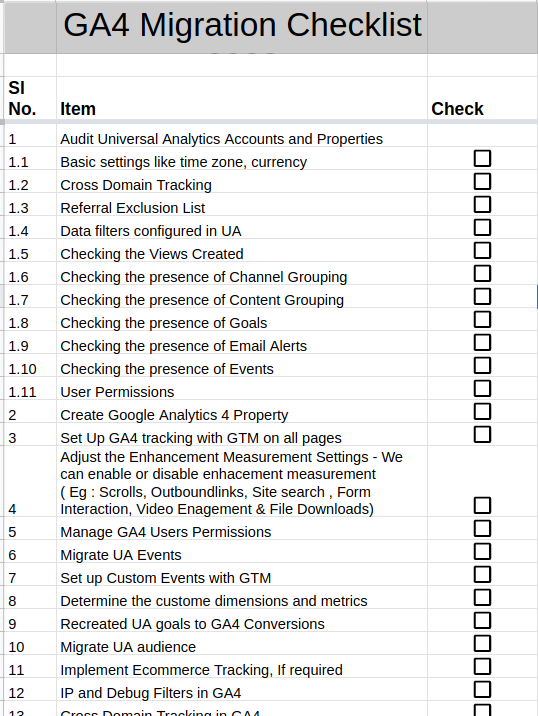
Download the complete GA4 migration checklist.
Tips for a Successful Google Analytics 4 Migration
- It would help if you understood the differences between UA and GA4 and how they impact your data analysis and reporting.
- There are significant changes in the user interface and report structure. Training your team on GA4's new features and functionalities is essential to get the full potential of GA4.
- You should communicate the migration plan to your stakeholders and clients, and keep them updated on the progress. Multiple departments will most probably use GA in your organization. Clear coordination will help a smoother migration and avoid unnecessary issues.
- Run a few iterations of the Test-Fix-Test cycle before July 1st to ensure that the data is accurately tracked and aligns with your business goals. We recommend completing the entire migration, including testing, before the end of March to get accurate data with all the audience/conversions etc., for at least two months for seamless operations. If you are not using GA for advertisement, retargeting etc., then no need to rush. Plan the migration to be complete, including testing, by June 1st week.
- Ensure your team takes advantage of Google's migration resources and support, such as the GA4 migration checklist and the Google Analytics Help Center.
What Happens if You Don't Migrate to GA4
After the July 1st, 2023 deadline, Google will no longer support Universal Analytics. UA will become read-only, and you may get six months (as per google) to export the data collected in your UA property before they completely shut down UA.
360 Universal Analytics users will get one more year to migrate to GA4. However, Google recommends that 360 users start the migration process as soon as possible to take advantage of the advanced features and capabilities of GA4.
Users with default UA configuration have nothing to worry about; they can use the one-click creation of GA4 tags and set up the tracking code in their websites/apps.
Please note that even if you migrate your UA to GA4, you still need to install the new GA4 tracking code in your website or tag manager and double-check the configuration to ensure that the data is being accurately tracked.
Conclusion
The MarTech team of Zyxware Technologies has good experience migrating complex UA properties to GA4. Our team can help you conduct a comprehensive GA Migration Audit that includes a review of your Goals, Reports, Content Groups, Channel Classification, Views, Events, Custom Dimensions, Automated Emails, and other relevant items. We'll work with you to identify any issues that may arise during the migration process and provide solutions to ensure a successful transition to GA4.
We can also provide expert support throughout the migration process, from creating your GA4 property to mapping your existing GA data to your new GA4 property. Our team of experienced GA specialists can help ensure that your migration goes smoothly and that you get the most out of GA4.
The migration from Universal Analytics to GA4 is a significant change, but it's necessary to stay ahead of the curve in digital marketing. Get in touch with our expert team for consulting, and we can help you ensure a smooth transition to GA4 and unlock the benefits of advanced tracking, analysis, and insights it offers.