
Connecting Microsoft 365 Mailboxes to Business Apps: OAuth, Consent and Scopes
Microsoft is disabling Basic authentication for most Exchange Online protocols (IMAP, POP, EWS), meaning apps can no longer send a username and password with every request. SMTP AUTH is an exception but will be disabled by default for existing tenants by the end of 2026. Therefore, connecting mailboxes to business apps now requires OAuth 2.01.
What OAuth changes
With OAuth 2.0, users sign in via Microsoft and approve permissions instead of giving the app their password. Microsoft issues an access token (valid for 60-90 minutes) to call the Microsoft Graph API, and a refresh token to get new access tokens1.
Apps use delegated permissions to act on behalf of a signed-in user, ensuring the app cannot access anything the user cannot. Application permissions run without a user present and require admin consent2.
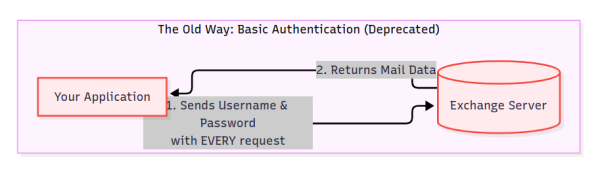
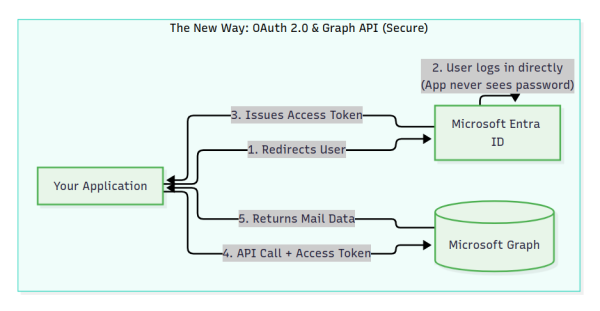
The Developer's Role: App Registration
For a developer building an integration, the very first step is registering the app in their own Microsoft Entra ID tenant. This "master copy" of the app generates the Client ID and Client Secret needed to communicate with Microsoft's servers2.
The Customer Admin's Role: Enterprise Applications
Later, when a customer wants to connect the app to their workspace, their IT Admin must review the requested permissions. Once the admin grants consent, Microsoft creates a local, linked instance of the app inside the customer's tenant, which appears under Enterprise applications2.
Common Mail Permissions
| Permission | What it allows | Standard user can consent? |
|---|---|---|
| Mail.Send | Send mail as the user. | Yes |
| Mail.ReadWrite | Read, create, update, and delete email (excludes sending). | No (Requires admin review) |
| User.Read | Sign in and read the user profile. | Yes |
| offline_access | Maintain access when the user is not signed in. | Yes |
Who can consent
By default, Microsoft prevents standard users from consenting to high-impact permissions like Mail.ReadWrite. Admins must approve these requests2. Admins can also restrict user consent entirely or limit it to apps from verified publishers.
Refresh Tokens and Revocation
The offline_access permission provides a refresh token (default 90-day lifespan) that keeps the app connected. Access ends if the token expires, is revoked, or if an admin resets the user's password3.
How to revoke access:
- Users: Can revoke permissions they granted via the My Apps portal4.
- Admins: Can revoke any permissions via Enterprise applications4.
How Zygnet Plexus Connects
Zygnet Plexus is a sales outreach tool currently in private beta at Zyxware that allows users to connect Microsoft Outlook as an email provider. To automate outreach campaigns while respecting Microsoft's security model, Plexus integrates with Microsoft Entra ID and the Microsoft Graph API across the following lifecycle:
1. The Admin Consent Gateway
Because Plexus requires the Mail.ReadWrite scope, it triggers Microsoft's default security policies. Before standard users can connect their work accounts, an IT admin at the customer's organization must review and approve the Plexus Enterprise Application. (This hurdle does not apply to personal Outlook accounts, which users can approve directly).
2. Connection Flow
When a user connects an account, Plexus initiates the OAuth 2.0 Authorization Code flow. Microsoft's endpoint validates credentials and returns an authorization code. Plexus securely exchanges this code for an Access Token and a Refresh Token.
3. Token Security
Refresh tokens are encrypted at rest. Plexus proactively uses them to request a fresh Access Token whenever less than five minutes remain on the current token's lifespan. If Microsoft rejects a refresh attempt, Plexus purges the stored tokens and updates the settings to show Not Connected.
4. Sending Campaigns
Plexus sends outgoing emails by making a POST request to the Microsoft Graph /users/{from_email}/sendMail endpoint over HTTPS, bypassing outbound SMTP port restrictions. Messages sent through Graph automatically appear in the user's native "Sent Items" folder.
5. Reading the Inbox
Plexus employs a scheduled polling baseline for the private beta. Every five minutes, it queries /users/{email_address}/messages using $filter to retrieve only new messages received since the last check. To optimize performance, it does not use $expand=attachments in the initial query. Instead, it checks the boolean field hasAttachments. If true, Plexus makes a separate follow-up GET request to the specific message's attachments endpoint. This avoids inflating the main messages list payload and prevents Graph API payload size limit errors on messages with large attachments.


